Managing employee leave requests is a common process in every organization, yet it is often handled inefficiently. Many teams still rely on email chains, spreadsheets, or disconnected systems to track vacation days, sick leave, and approvals. This approach creates confusion, delays, and a lack of visibility for both employees and managers.
SharePoint provides a strong foundation for managing structured data, but out of the box, it does not deliver a complete leave management experience. This is where Infowise Ultimate Forms transforms SharePoint into a fully functional leave request system. With modern forms, built-in approvals, automation, and reporting, you can implement a complete solution quickly and without custom development.
This article walks through how to build a leave request system in SharePoint using Ultimate Forms, highlights key capabilities, and explains how it improves efficiency, visibility, and user experience.
Why Traditional Leave Tracking Falls Short
In many organizations, leave requests are still handled through manual processes:
- Employees send email requests
- Managers respond with approvals or questions
- HR tracks leave balances in spreadsheets
- Information is scattered across inboxes and files
This creates several challenges:
- No centralized record of requests
- Delays in approvals
- Limited visibility into team availability
- High risk of errors and inconsistencies
- Time-consuming administrative work
A structured, automated system eliminates these issues and provides a better experience for everyone involved.
SharePoint as the Foundation
A leave request system starts with a SharePoint list that stores all request data. Typical columns include:
- Employee name
- Leave type
- Start date
- End date
- Number of days
- Reason for leave
- Status
- Manager comments
This list becomes the central repository for all leave requests. With Ultimate Forms, you can turn this simple list into a complete application.
Designing a Modern Leave Request Form
The first step is creating a user-friendly form.
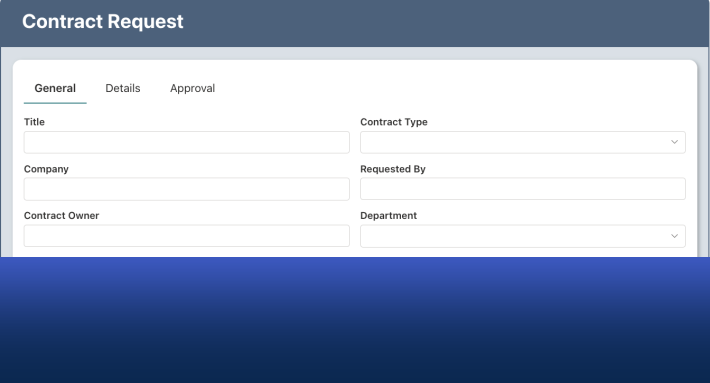
Ultimate Forms Modern Forms allows you to design forms that are structured, intuitive, and responsive. You can organize columns into tabs or sections such as:
- Request Details
- Manager Review
- HR Processing
Employees see only the columns they need to complete. Managers and HR staff see additional sections as the request progresses.
Conditional visibility ensures that the form remains clean and easy to use.
Automatic Calculations and Validation
Leave requests often require calculations.
For example, the system can automatically calculate the number of days between the start and end dates. It can also validate entries to ensure:
- End date is not before start date
- Required columns are completed
- Leave requests do not overlap with existing requests
These rules are configured directly in the form, reducing errors and eliminating manual checks.
Built-In Approval Process
Approvals are a critical part of leave management.
Ultimate Forms includes an Approval Control, which acts as an approval-in-a-box solution. Instead of building workflows externally, approvals are configured directly within the form.
The system can support:
- Single or multiple approval stages
- Sequential or parallel approvals
- Automatic or manual start
- Email notifications and reminders
Managers receive notifications when a request is submitted. They can review the request and approve or reject it directly within the form.
The approval log, status, and actions are all visible in one place.
Real-Time Status Tracking
Every leave request includes a status column that reflects its current state, such as:
- Submitted
- In Progress
- Approved
- Rejected
Ultimate Forms automatically updates the status as the request moves through the approval process.
In list views, status indicators and progress bars provide clear visibility. Managers and HR teams can quickly see which requests are pending, approved, or overdue.
Automating Notifications
Communication is essential in leave management.
Ultimate Forms Actions can send automated notifications when:
- A request is submitted
- A request is approved or rejected
- A request is updated
- A reminder is needed
Emails can include dynamic content such as employee name, dates, and leave type.
This ensures that all stakeholders are informed without manual follow-up.
Preventing Scheduling Conflicts
One of the key challenges in leave management is avoiding conflicts.
Using Ultimate Forms, you can implement rules to:
- Check overlapping requests for the same employee
- Notify managers when multiple team members request leave at the same time
- Enforce limits on the number of employees off during a given period
These safeguards help maintain operational continuity.
Managing Leave Balances
Many organizations need to track leave balances.
Ultimate Forms can integrate with additional lists to store:
- Total allocated leave
- Used leave
- Remaining balance
When a leave request is approved, the system can automatically update the employee’s balance.
This eliminates the need for separate tracking systems and ensures accuracy.
Real-World Scenario: HR Leave Management
In a typical HR environment:
- An employee submits a leave request through the form
- The manager receives an email notification
- The manager reviews and approves the request
- The system updates the status and logs the approval
- HR is notified and updates records if necessary
- The employee receives confirmation
All steps are handled automatically within SharePoint.
There are no emails to track manually and no spreadsheets to update.
Real-World Scenario: Team Availability Planning
Managers need visibility into team availability.
Using dashboards built with Ultimate Forms, managers can view:
- Upcoming leave requests
- Approved time off
- Team availability by date
Charts and filters allow managers to plan workloads and avoid scheduling conflicts.
This improves productivity and reduces disruptions.
Reporting and Insights
Because all data is stored in SharePoint, reporting becomes simple.
Organizations can generate insights such as:
- Total leave taken by department
- Leave trends over time
- Most common leave types
- Peak vacation periods
These insights help organizations make better staffing and policy decisions.
Improving User Experience
A well-designed leave request system improves the experience for all users.
Employees benefit from:
- Simple, guided forms
- Immediate confirmation
- Clear status tracking
Managers benefit from:
- Easy approval process
- Visibility into requests
- Automated notifications
HR teams benefit from:
- Centralized data
- Reduced administrative work
- Accurate records
Fast Deployment and Easy Maintenance
One of the biggest advantages of Ultimate Forms is speed.
A complete leave request system can be configured quickly using:
- Form Designer
- Approval Control
- Actions
- Dashboard components
There is no need for custom development or complex workflows.
As requirements change, administrators can update the system easily without rebuilding it.
Conclusion
A leave request system is a critical part of workforce management, but it does not have to be complicated.
With Infowise Ultimate Forms, you can transform a simple SharePoint list into a powerful, automated solution. Modern forms, built-in approvals, automation, and reporting tools work together to create a seamless experience for employees, managers, and HR teams.
The result is faster approvals, improved visibility, fewer errors, and reduced administrative effort.
If you are looking to modernize your leave management process, Ultimate Forms provides a practical and efficient way to build a complete solution directly in SharePoint.
Add your comment