Forms
Actions
Alerts
Associated Items
Connected Lookup
Print
Import
Signature
External Data Lookup
Calendar
Rollups
Charts
Counters
List Search
Filters
Item IDs
Color Choice
User Property
Document Link
Voting
Stay in the know
Get helpful videos
Add voting to SharePoint lists and documents: one vote per person, comments, rankings, and voter controls. Ideas and feedback, ranked without code.

Ultimate Forms: Voting
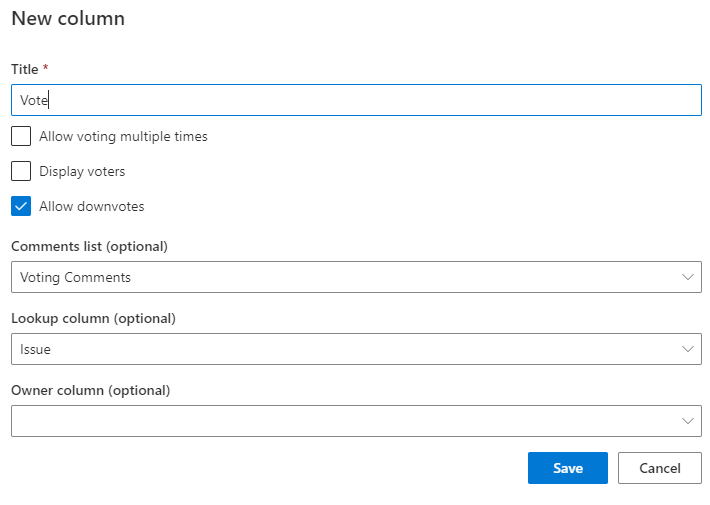
adds voting to any SharePoint list or document library. Users vote directly from views, even with read-only access, leave comments, and start discussions, while you control the rules: one vote per person or several, restricted voter groups, and no voting on your own submissions. Items sort by ranking with counts and percentages displayed, turning any list into an idea board, a feedback channel, or a prioritization tool. Configured as a column, no code.
Every organization says it wants feedback. Voting is how a SharePoint list actually collects it.
Opinions exist. Capture is the problem.
People have views on the intranet article, the policy draft, the proposed features, and the templates in the library. What they lack is a one-click way to express them where the content lives, so opinions travel by hallway and email, arrive unevenly, and count for whoever spoke loudest. Meanwhile "which ideas should we fund" gets decided from a spreadsheet someone assembled by hand.Voting moves the signal into the list itself: click, count, rank, done.
What Voting can do
One click, right in the view
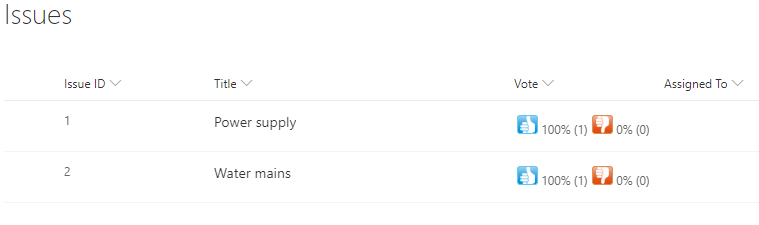
Voting buttons appear directly in list views, so participating costs seconds and no navigation. Crucially, voting is enabled even for readers, so the whole organization can weigh in on content they cannot edit, which is exactly the audience whose opinion you wanted.Fair by configuration
Credible results need rules, and Voting enforces them: limit users to a single vote or allow several, prevent item owners from voting on their own submissions, and restrict voting to specified users and groups when only certain audiences should decide. The outcome is a ranking people can trust without an honor system.From raw votes to a ranked answer
Vote counts and percentages display on the items, and views sort by vote ranking, so the leaderboard builds itself: the top-voted ideas rise, the weak ones settle, and the prioritization meeting starts from evidence. Downstream, results feed the rest of the platform, from counters showing participation to Actions promoting winners into a delivery pipeline automatically.Votes with voices
Numbers say which; comments say why. Optionally let voters add comments and start discussions, with a talkback section beneath the item details, so the rating and the reasoning stay attached to the content they concern instead of scattering into email threads.Compared with Native SharePoint
| Ultimate Forms | Native SharePoint | |
|---|---|---|
| Vote directly from a view | ✓ |
|
| Optionally limit to one vote per person | ✓ |
|
| Prevent item owners from voting on their own items | ✓ |
|
| Optionally specify users and groups allowed to vote | ✓ |
|
| Optionally leave comments and start discussions | ✓ |
|
| Create talkback section beneath item details | ✓ |
|
| Localized into English, French, Spanish and German | ✓ |
✓
|
Where teams use it
Idea and innovation boards where employees submit and the organization ranks. Feature request lists that prioritize themselves. Knowledge base articles rated by the people they are supposed to help, on the Help Desk template. Draft policies and designs collecting structured reactions before sign-off, and visitor feedback through the Guestbook template. Wherever "what does everyone think" matters, Voting replaces the guess with a number.Frequently asked questions
Can users vote on items in a SharePoint list?
Yes. Voting adds vote buttons to any list or library, with votes cast directly from views and results displayed as counts and percentages.Can I limit voting to one vote per person?
Yes. Configure a single vote per user or allow multiple votes, whichever fits the exercise.Can people with read-only access vote?
Yes. Voting works even for readers, so the entire organization can participate without edit permissions.Can I stop people from voting for their own submissions?
Yes. Item owners can be prevented from voting on their own items, keeping rankings credible.Can votes include comments?
Yes. Voters can optionally leave comments and start discussions, with a talkback section beneath the item details.Can I sort a list by vote results?
Yes. Views sort by vote ranking, so the highest-rated items surface automatically.Screenshots